
Use *, an asterisk character, known as a wildcard, to match one or more words in a phrase (enclosed in quotes).
Each * represents just one or more words. Google treats the * as a placeholder for a word or more than one word. For example, [ “Google * my life“ ] tells Google to find pages containing a phrase that starts with “Google” followed by one or more words, followed by “my life.” Phrases that fit the bill include: “Google changed my life,” “Google runs my life,” and “Google is my life.”
If you know there’s a date on the page you’re seeking but you don’t know its format, specify several common formats using the OR operator. For example:
[ California election “Oct * 2003“ OR “10/*/03“ OR “October * 2003“ ]
When you know only part of the phrase you wish to find, consider using the * operator. Find the title of Sherry Russell’s book that can help you deal with the tragedies of 9/11 or losing a loved one.
[ “Conquering the * and * of Grief“ ]
Proximity searching can be useful when you want to find pages that include someone’s name in any of the following orders: first middle last, last first middle, first last, last first. To search for “Francis” adjacent or separated one word from “Coppola,” requires four queries:
[ “Francis Coppola“ ]
[ “Francis * Coppola“ ]
[ “Coppola Francis“ ]
[ “Coppola * Francis“ ]
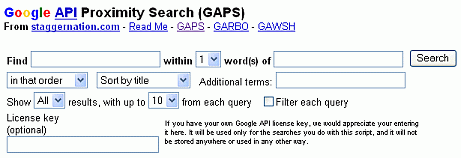
If you want to search for two terms separated by no more than two words, i.e., a proximity search, you’ll need six queries. If you’re interested in running proximity searches, try out GAPS, a third-party search tool available at https://www.staggernation.com/cgi-bin/gaps.cgi.
Note: You can get around Google’s 32-word limit on the number of words in your query by substituting an * in place of each stop word or common word in your query. Wildcards are not counted.
USE [ All grown-ups * once children–although few * them remember * ]
NOT [ All grown-ups were once children–although few of them remember it ]
Google chose the symbol * to match one or more words because in some computer systems, such as Unix, Linux, and DOS, * stands for one or more unspecified characters. In those languages it is typically used for selecting multiple files and directories.
Note: Stemming is a technique to search on the stem or root of a word that can have multiple endings. For example, on some search engines the query bicycl* will return results that match words including bicycle, bicycles, bicycling, bicycled, and bicyclists. Google ignores asterisks (*) that are not surrounded by spaces. The query [ bicycl* ] finds documents that contain “bicycl.” Google automatically provides stemming.
If you want to search for a string with an asterisk or another special character, try using www.google.com/codesearch, Google’s Code Search Engine.
tags (keywords): No Tags
